
Press
Press kit
Everything needed to write about Viya App Studio or LockBox, in one place. All assets on this page may be used in editorial coverage. If you need something that isn't here, just ask.
Press contact
viyaappstudio@gmail.com
Elsewhere
X @viyaappsdev · Instagram @viyaappstudio
Descriptions
One sentence
LockBox keeps sensitive photos, videos, and documents in an encrypted vault on your iPhone. No account, no cloud, no server — the key never leaves your device.
One paragraph
LockBox — Private Media Vault is a private media vault for iPhone and iPad. Photos, videos, and documents are encrypted with AES-256-GCM on the device and unlocked with Face ID, Touch ID, or a passcode. There is no account and no server: the key is generated on the phone, stored in the iOS Keychain, and never syncs anywhere. Premium adds a decoy vault that opens with a second passcode, silent intruder capture after repeated failed unlocks, and encrypted export of the whole vault as a single file. Version 1.1.3 is available now, localised into 10 languages.
Fast facts
- Name
- LockBox — Private Media Vault
- Developer
- Viya App Studio (Türkiye)
- Version
- 1.1.3
- Released
- Version 1.1, 21 July 2026
- Platforms
- iPhone, iPad
- Requires
- iOS 17+
- Languages
- 10
- Price
- Free, with an optional Premium upgrade
- Category
- Utilities / Photo & Video
Features
- AES-256, on device — Every file is encrypted with AES-256 before it touches disk. Keys live in the iOS Keychain, and nothing is uploaded to a server — there is no server.
- Face ID, Touch ID, or a passcode — The vault unlocks with biometrics or a passcode you choose. Individual albums can take a separate PIN, with lockout after repeated wrong attempts.
- Albums that stay organised — Group photos, videos, and documents into albums with custom covers. Import straight from Photos or Files, or shoot into the vault with the built-in private camera.
- Decoy vault Premium — A second passcode opens a harmless-looking vault with content you choose. If you are ever asked to unlock the app, you have something to show.
- Intruder capture Premium — After repeated failed unlock attempts, LockBox silently photographs whoever is holding the phone and logs the time.
- Encrypted backup & restore Premium — Export the whole vault as a single encrypted .lockbox file you can store or move to a new device. Vault data is deliberately excluded from iCloud backups.
Screenshots
Right-click to save. These are the current store screenshots at full resolution.
-
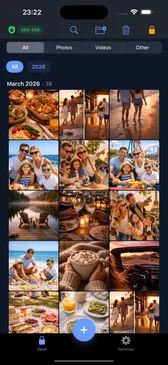
The vault itself — photos, videos, and files, encrypted at rest.
-
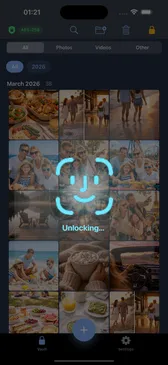
AES-256, unlocked with Face ID. Nothing decrypts until you do.
-
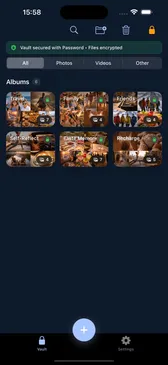
Albums with custom covers, and a separate PIN on any of them.
-
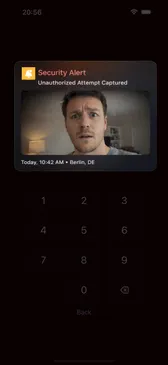
Intruder capture: a silent photo after repeated failed unlocks.
-
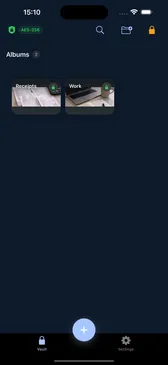
The decoy vault — a second passcode opens something harmless.
Logos and icons
-

LockBox app icon
1024×1024 PNG -

Viya App Studio logo
1024×1024 PNG
Please don't recolour, crop, or add effects to the marks. If you need a different format or a transparent background, email us and we'll send it over.
Other apps
- Cronk — Recurring Reminders — Reminders on any interval — hours to years — that escalate until done and keep a history of every completion. Guided by Coco the crow. (Available now)
- 7 Square — Merge Number Puzzle — A calm merge-number puzzle on a 7×7 board: move tiles around the others, touch three that match, and watch them merge into bigger numbers. (Available now)
- Trivara — Trivia Wheel — A trivia game with a category wheel, timed questions, and streaks worth chasing — in 10 languages, fully offline, with no ads and no tracking. (Coming soon, not yet on the App Store)